Skip to content

Send budgets and limits

Every connected mailbox has a send budget: the most messages it will send in any rolling 24 hours. This page is the reference for how that number is worked out and what you can change.

Under each connected mailbox, ColdMerge shows the budget in one line, for example:

12 of 20 sends left. 8 used in the last 24 hours. Ramping up: day 2. The limit rises as the mailbox ages.

When the budget is spent, the same line reads:

Stopped: this mailbox has used all 20 of its sends. Refills as the rolling 24-hour window rolls forward.

The line always ends by naming which of the four limits is holding the mailbox there. That last sentence is the useful part, because three of the four limits lift on their own and one never does.

The line appears only while the mailbox is connected. A disconnected mailbox is sending nothing, so a budget for it would be a promise it cannot keep.

A connected mailbox row zoomed in on the send budget line, showing “N of M sends left”, the used
count, and the binding-limit sentence.

The budget is measured over a rolling 24 hours, not a calendar day. It does not reset at midnight.

At any moment, ColdMerge counts what the mailbox has sent in the previous 24 hours. As time moves forward, sends made more than 24 hours ago drop out of the count and that capacity comes back.

So a mailbox that spent its whole budget at 2pm yesterday gets it back gradually from 2pm today, in the same shape it was spent, rather than all at once at midnight.

This is on purpose. Google does not enforce a calendar day either, and a midnight reset would let two days’ worth of mail out in the space of a few hours, which is exactly the pattern that gets accounts flagged.

Counts Does not count
Messages that were sent Messages that failed
Messages that are pending
Preview sends

A failed message does not drain the budget, because it demonstrably reached nobody. A preview send does drain it, because it is a real message really handed to Gmail.

The budget is the lowest of four limits. Only one binds at a time, and the line on the Accounts page names it.

They are listed here in the order ColdMerge names them when two are tied.

A brand-new mailbox that suddenly sends hundreds of cold emails is exactly what Google’s spam systems look for. So ColdMerge starts every mailbox low and raises it over five weeks.

Days since the mailbox was connected Age step
Days 1 to 3 20 a day
Days 4 to 7 40 a day
Days 8 to 14 75 a day
Days 15 to 21 150 a day
Days 22 to 28 300 a day
Days 29 to 35 500 a day
Day 36 onward No limit from this term

Day 1 is the day you connected the mailbox. From day 36 the age step stops limiting anything at all, and the other three terms decide.

When this term is binding, the line reads: “Ramping up: day 2. The limit rises as the mailbox ages.”

Disconnecting and reconnecting a mailbox does not restart the ramp. ColdMerge remembers when the mailbox was first connected.

This is the one term the declared volume setting can raise.

The second limit is twice the busiest 24 hours this mailbox has had in the last seven days, with a floor of 20 so a brand-new mailbox can start at all.

When this term is binding, the line reads: “Twice its busiest 24 hours in the last week. Sending more lifts it.”

Two details follow from that.

It only counts completed periods, never the sending happening right now. If it counted the live window, twice what you have sent so far would always be more than what you have sent so far, so the limit could never bind and each send would raise the ceiling for the next one.

A mailbox that goes quiet ramps again. If the mailbox sends nothing for a week, its recent peak falls away and it climbs back up from the floor. This is not a fault. A mailbox that has been silent for a fortnight and then sends 500 in an afternoon looks exactly like a compromised account.

Your own limit, set per mailbox, in the Send budget dialog. It is unset by default.

When this term is binding, the line reads: “The 150/day cap you set.”

A cap can only ever lower what the mailbox sends. Setting a cap of 900 on a mailbox on day 2 of its ramp changes nothing, because the age step of 20 is still the lowest of the four.

The hard ceiling, which nothing lifts.

Mailbox type Ceiling
Google Workspace About 2,000 a day
Free Gmail 100 a day

When this term binds on a Workspace mailbox, the line reads: “Google’s ceiling for a Workspace mailbox, 2,000/day. Nothing lifts it.”

On a free Gmail mailbox it reads: “Free Gmail is held to 100/day on purpose, under Google’s limit, to lower suspension risk. Use a Workspace mailbox to send more.”

The 100 is ColdMerge’s number, not Google’s. Google itself permits roughly 500 a day from a free account.

ColdMerge holds free accounts lower on purpose. Cold outreach from a personal @gmail.com account carries a much higher risk of Google suspending it, and that is a suspension nobody can reverse for you. If you need to send more than 100 a day, use a Google Workspace mailbox on a domain you own.

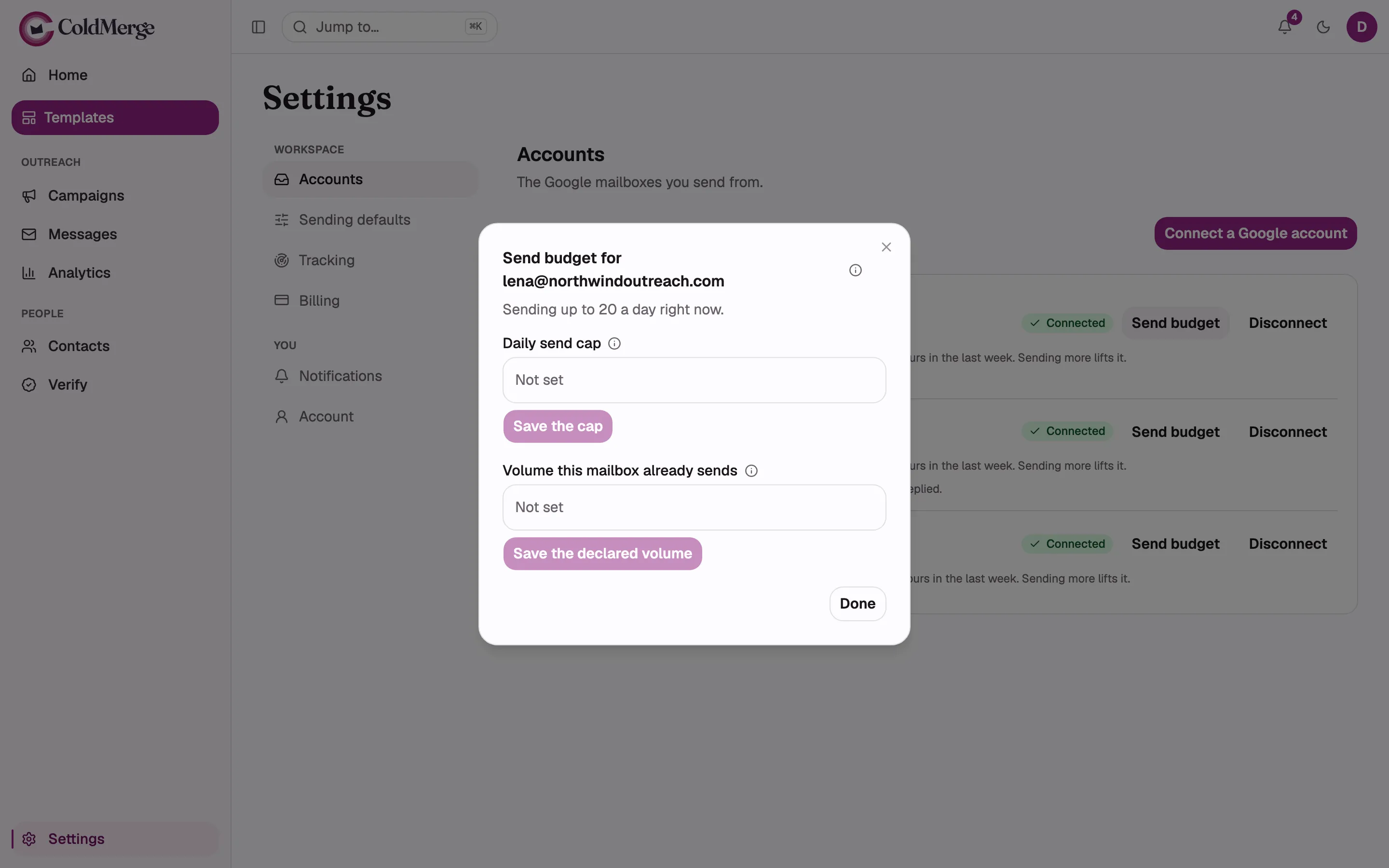
Select Send budget on a mailbox row to open it. The dialog is headed “Send budget for your address” and its description tells you the number in force right now: “Sending up to 20 a day right now.”

The information icon beside the title states the whole rule in one sentence:

This mailbox sends the lowest of four limits: connection age, twice its busiest recent day, your cap, and Google’s ceiling. The window is a rolling 24 hours, not a calendar day.

There are two fields. Each one saves itself. There is no apply step, so the Done button at the bottom only closes the dialog.

The Send budget dialog open, showing the title with its info icon, the “Sending up to N a day
right now.” description, both fields with their labels and info icons, and the Done button.

Available to everyone, including Members.

Type a whole number of emails a day and select Save the cap. If a cap is already set, a Remove the cap button appears beside it. Clearing the field and saving also removes the cap.

The field’s own hint says it plainly: “Applied as one of the four limits. It can only lower what this mailbox sends, never raise it.”

Owner and Admin only. Members do not see this field at all.

This is for a mailbox you are moving over from another tool. Without it, a mailbox that has been happily sending 300 a day for a year would still be held to 20 on its first day in ColdMerge.

Type the number this address really sends each day elsewhere and select Save the declared volume. Remove the declaration clears it.

The field’s own hint sets the boundaries:

How many emails a day this address really sends elsewhere, so a mailbox from another tool is not held to twenty on day one. It raises the ramp-up only, never Google’s ceiling or the twice-your-busiest-day limit. Declaring more than it really sends risks a Google suspension we cannot undo for you.

So a declaration raises limit 1 and nothing else. Limit 2 still applies, which means a mailbox that declares 300 still climbs on the volume it actually demonstrates here, roughly doubling each period. It gets there in days rather than five weeks, but it does not jump there instantly.

When a declaration is what is holding the mailbox, the line on the row reads: “Held to the 300/day you declared for this mailbox.” When the calendar has already earned more than you declared, ColdMerge uses the higher of the two and does not credit the declaration for a number it did not produce.