Skip to content

Ramp-up and send budgets

Connect a brand new mailbox to ColdMerge and it will send 20 emails on its first day. Not 500. Twenty. This page explains why that is deliberate, how the number climbs, and how to read the send budget line on the Accounts screen.

Google watches sending behaviour, not just message content. A mailbox that has sent 5 emails a day for two years and suddenly sends 400 to strangers looks exactly like a mailbox somebody just broke into. The pattern itself is the signal.

The safe way to raise your volume is the boring way: send a bit more each week, consistently, and let the pattern establish itself. This is usually called warm-up. In ColdMerge it is called ramp-up, and it is automatic. You do not schedule it or manage it. It just holds the ceiling down and lifts it as time passes and as you actually send.

An analogy: nobody runs a marathon in week one of training. You build up. The limit is not there to stop you running, it is there so you are still able to run in month three.

The age of a connected mailbox sets a ceiling, counted in days from the moment you connected it:

Days since you connected Ceiling from age
1 to 3 20 a day
4 to 7 40 a day
8 to 14 75 a day
15 to 21 150 a day
22 to 28 300 a day
29 to 35 500 a day
36 onward no longer limits you

From day 36, age stops holding the mailbox back at all. One of the other limits below takes over.

Reconnecting does not restart this clock. If you disconnect a mailbox and connect it again, ColdMerge remembers when it was first connected. There is no way to reset your way back to day one, and no reason to want to.

Migrating a mailbox that already sends a lot

Section titled “Migrating a mailbox that already sends a lot”

If you are moving from another tool and the mailbox genuinely sent 800 emails yesterday, starting at 20 is silly. An Owner or Admin can declare the mailbox’s real current daily volume on the Accounts screen, which lifts the age ceiling only.

Two things it does not do. It never raises Google’s own ceiling. And it never touches the demonstrated-volume limit below, so the mailbox still sends 20 on its first day here, then climbs on volume it actually proves through ColdMerge. The climb takes days rather than the full five weeks, but it is still a climb.

That is on purpose. A declaration is something you type. Sending is something you did.

At any moment, a mailbox’s allowance for the next 24 hours is the smallest of four separate numbers:

  1. The age step. The ramp table above, or your declared volume if that is higher.
  2. Your demonstrated recent volume. Roughly twice the busiest 24 hours this mailbox has actually completed in the last week, with a floor at 20 so a cold start is possible at all. Send more, and this lifts. Go quiet for a while and it decays, and the mailbox ramps up again from scratch.
  3. The daily cap you set. Your own caution setting, per mailbox. Nothing overrides your own number downward.
  4. The provider ceiling. Roughly 2,000 a day for a Google Workspace mailbox. For a free @gmail.com address, ColdMerge holds you to 100 a day even when fully ramped, against the roughly 500 Google itself permits. That lower number is ColdMerge’s choice, not Google’s. Free accounts carry a much higher suspension risk for cold outreach, and we would rather refuse to help you burn a personal Gmail than honour a number Google technically allows. If you need more, use a Workspace mailbox.

While you are on a free trial, one more limit sits alongside those four, but it is not per mailbox: it is a 100-recipient cap for your whole workspace, combined across every mailbox and every campaign, per day. It is what makes a trial usable without a card up front, and it resets at UTC midnight. Add a payment method (or your trial converts) and it lifts, with no other change to the four limits above.

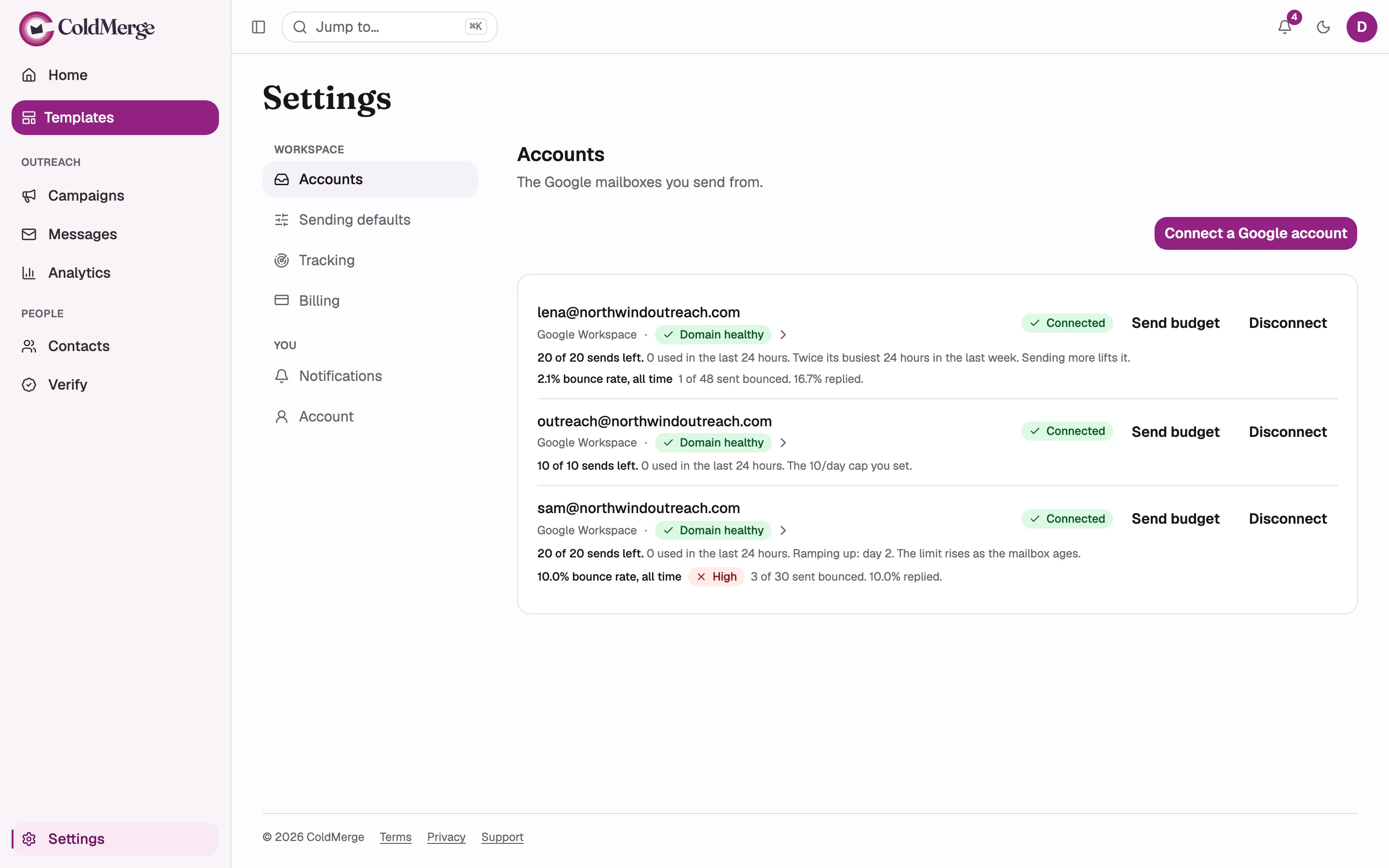
Four different reasons a mailbox can be slow, and they are not interchangeable. Three of them resolve themselves (age with days, demonstrated volume with sending, your cap with one click) and Google’s ceiling never will. So ColdMerge does not just show you the number. It names which limit is in force, in a sentence, right under the mailbox.

The send budget line on the Accounts screen, captured in each of its four binding states: ramping
up by age (“Ramping up: day N”), demonstrated volume (“Twice its busiest 24 hours in the last
week”), a configured cap, and the provider ceiling in both its Workspace and free-Gmail wording.

The budget is a rolling 24 hours, not a calendar day.

Google does not reset anything at midnight, so neither does ColdMerge. If it did, a mailbox could spend its whole allowance at 11pm and its whole allowance again at 12:01am, putting two days of mail out in two hours. That is precisely the burst pattern the ramp exists to avoid.

Rolling means the allowance refills gradually, as individual sends from the last day pass out of the window, rather than all at once. Think of a bathtub with the plug slightly open rather than a bucket that gets emptied on a schedule.

What drains the budget: every message that has been sent or is about to be sent, plus every preview send. A preview is a real email leaving your real mailbox, so it costs a real send. A message that failed outright does not drain anything, because it demonstrably reached nobody.

“Stopped: this mailbox has used all of its sends”

Section titled ““Stopped: this mailbox has used all of its sends””

When the allowance is spent, the send budget line reads:

Stopped: this mailbox has used all N of its sends. Refills as the rolling 24-hour window rolls forward.

This is not an error, and nothing is broken. It is the guardrail doing its job. Your campaign has not failed, lost anybody, or forgotten where it was. It has run out of today’s allowance and will carry on as the window rolls forward, which is ordinary progress, the same way a campaign too large to finish today simply continues tomorrow.

If you want more headroom, in rough order of how quickly it helps:

  • Connect another mailbox, so work spreads across more of them. See How ColdMerge sends for how rotation works.
  • Raise your own daily cap, if that is the limit that is binding.
  • Keep sending consistently, which lifts the demonstrated-volume limit.
  • Wait, if age is the limit. It lifts itself and stops mattering after day 35.

If the binding limit is Google’s Workspace ceiling, nothing lifts it. That is the honest answer, and the line on screen says so.